How to Register Your Account
Welcome to Dragon Ball Online Zero! Creating your account is quick and secure. For maximum security, all account registrations are done directly through the game launcher.
Registration Steps
1Download and Install the Game
Before you can register, you need to download and install Dragon Ball Online Zero. Visit our Download Page and follow the installation guide.
2Launch the Game Launcher
After installation, open the Dragon Ball Online Zero launcher from your game folder or desktop shortcut.
- Locate the launcher executable in your installation folder
- Run the launcher (you may need to run as Administrator)
- Wait for the launcher to load completely
3Click "Register"
On the launcher login screen, you'll see a "Register" button. Click it to begin the registration process.
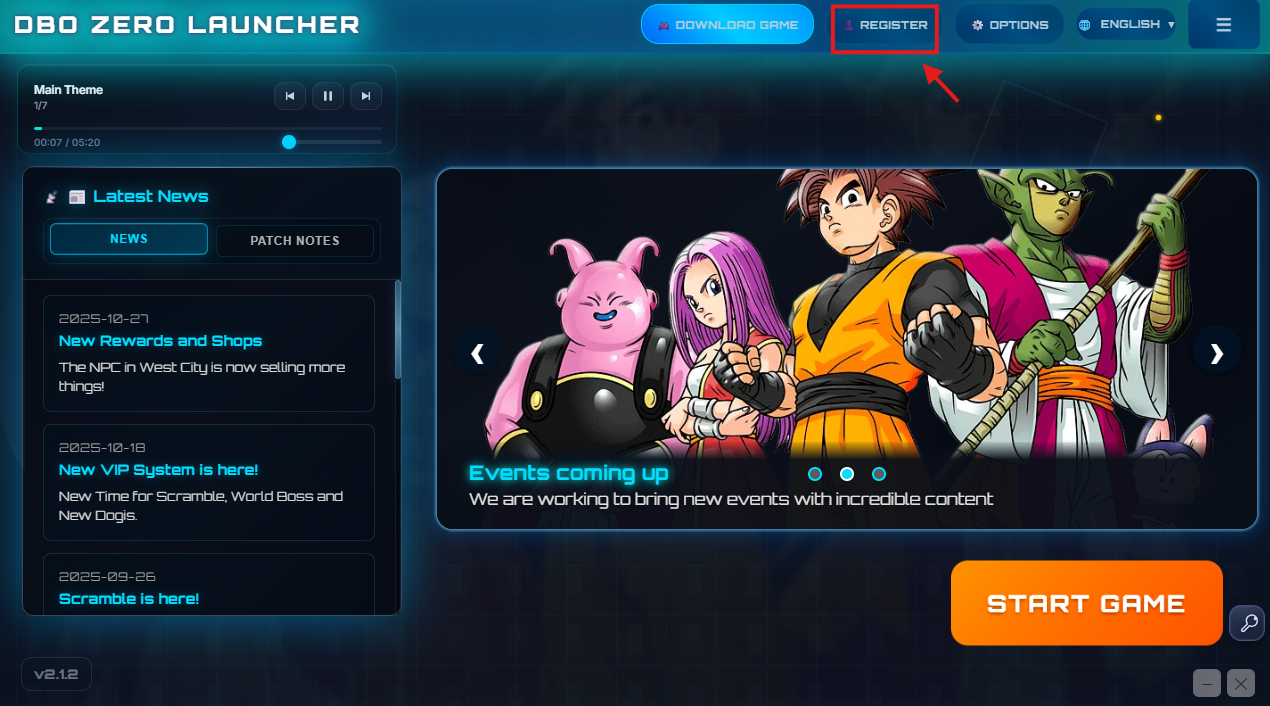
Launcher login screen showing the Register button
4Fill in Your Account Information
Enter your desired account details:
- Username: Choose a unique username (3-16 characters)
- Password: Create a strong password (minimum 6 characters)
- Confirm Password: Re-enter your password to confirm
- Email: Provide a valid email address for account recovery
5Complete Registration
After filling in all required information:
- Review your information carefully
- Click the "Register" button to confirm
- Wait for confirmation that your account was created successfully
- You can now log in with your new credentials!
Account Security Tips
Keep Your Account Safe
- Never share your password with anyone, including staff members
- Use a unique password that you don't use on other websites
- Enable two-factor authentication if available
- Keep your email address up to date for account recovery
- Be cautious of phishing attempts and fake websites
- Log out when using shared computers
Troubleshooting
Common Issues
Launcher won't open:
- Install Microsoft Edge WebView2 from our Download page
- Run the launcher as Administrator
- Check if antivirus is blocking the launcher
Registration button is grayed out:
- Make sure all fields are filled correctly
- Check that your password meets minimum requirements
- Verify your email address format is correct
Username already taken:
- Try a different username
- Add numbers or special characters to your desired name
What's Next?
After successfully creating your account, you're ready to begin your adventure!
- Log in to the game using your new credentials
- Create your first character and choose your race
- Complete the tutorial to learn the basics
- Join our Discord community to meet other players
- Check out the Builds page to plan your character progression